
Raids: Night Tide Controls
HUD prompts decoded: interact, NVG, lean, slots 1–3, and mobile equivalents.
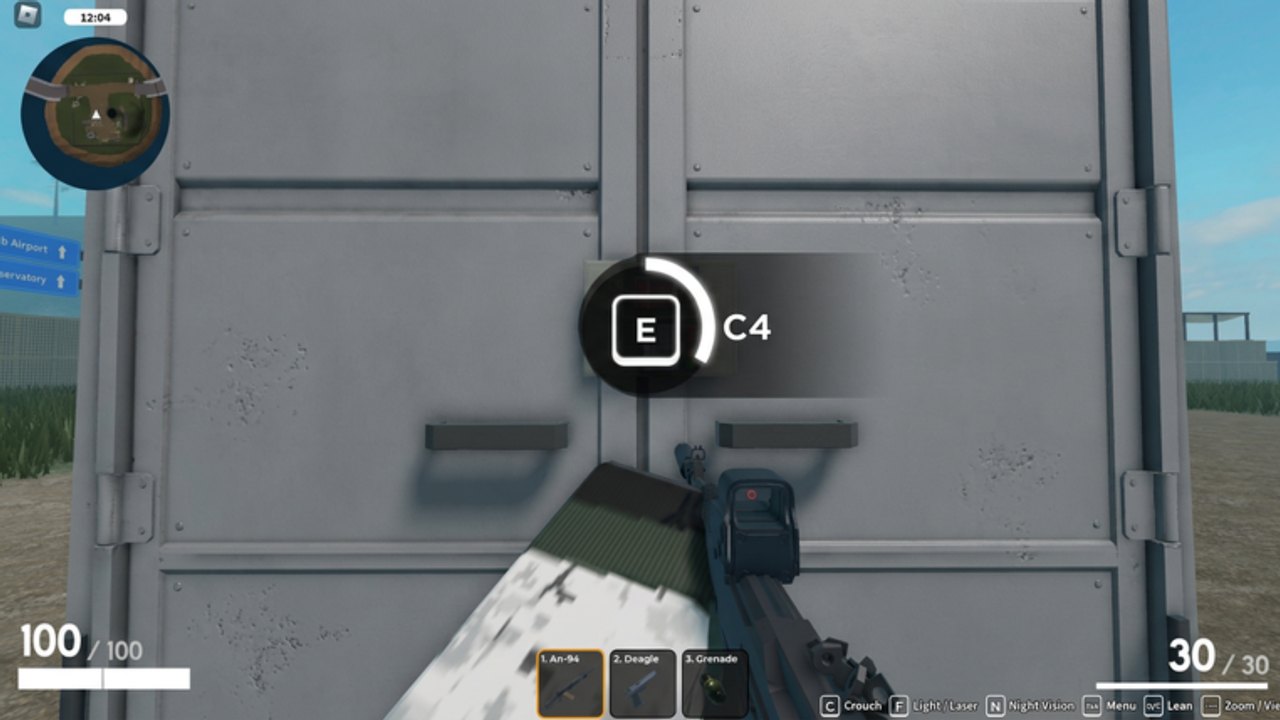
Raids: Night Tide is a Roblox shooter, so your movement keys are the usual WASD plus camera. The raid-specific HUD is what actually gets people killed: they do not plant C4 because they never noticed E, or they leave a laser on in a dark hangar because F was a mystery.
This page is the HUD as it appears in official captures, plus how those prompts map to raiding instead of to a generic FPS.
On-screen prompts (from the live HUD)
The bottom bar in the C4 door screenshot lists:
| Control | What it does in a raid |
|---|---|
| E | Interact / plant C4 on a marked door |
| Crouch | Lower profile at windows and turret lines |
| F | Cycle Light / Laser / Night Vision |
| Menu | Shop, codes, loadout, garage |
| Lean | Peak a door without standing in the frame |
| Zoom / View | ADS or tighten the camera for mid-range |
Weapon slots sit in the middle of the HUD:
- Primary — ARX-160, AK-47, AN-94, and other rifles
- Secondary — Glock 17 or Desert Eagle
- Utility — grenade or C4
HP is the left number (100 / 100 when full). Magazine is the right number (30 / 30 on the AN-94 still). If the right number is zero, swap to slot 2 instead of staring at the door.
E is the raid button
E plants C4 when the prompt says C4. E also burns documents, opens the interactable objective, and uses world props. If E does nothing, you are looking at a door that does not want C4, or you are too far away. Walk up until the radial prompt fills.
Do not bind your brain to “E always explodes.” Read the label. Planting C4 on a door your teammate is stacking is how squads wipe. Call it, then press it. How to raid assumes you already know this.
F is not a flashlight toy
F cycles Light, Laser, and Night Vision. In a moonlit airport, NVG helps. In daylight Uptown, NVG is a green filter. A laser in a dark hallway is a pointing stick for every AI rifle. Turn it off unless you need the point of aim.
Stealth players treat F like a discipline test. See stealth.
Lean and crouch
Lean is how you check a hangar without giving the turret your whole chest. Crouch for windows and low containers. Standing in a door frame is the default Recruit death. The three-man stack in the night hangar art works because nobody is silhouetted in the open.
Mobile
Mobile uses on-screen buttons for the same prompts. The labels still say E / F even if you are tapping a button. Copy codes from the how to redeem page before you open Roblox so you are not typing TURRETS on a tiny keyboard in Shop.
Flight controls on helicopters are touch-sensitive. Land wide. Read vehicles before you try a Fortress roof insert on a phone.
Menu, Shop, and codes
Menu is where Shop lives. Shop is where codes live. If you cannot find Codes, you are in Offers or Passes. That is a tab problem, not a keybind problem.
Loadout slots expand if you own Extra Accessories. You still switch them in Menu, not with a secret key.
Practice in a quiet base
Before Uptown, spend one small base only practicing prompts: lean every corner, plant one C4, toggle NVG off before you peek a camera, swap to pistol when the rifle is dry. Then go play the actual raid using getting started.
Controls will not aim for you. They will stop you from fighting the HUD while the turret fights you.
Frequently Asked Questions
Quick answers to the most common questions.
How do I plant C4?
Equip it in the utility slot, walk up to a marked door, and hold E when the C4 prompt appears.
How do I turn on night vision?
Press F to cycle Light / Laser / Night Vision. Turn lights and lasers off if you are trying to stay quiet.
What are the 1 / 2 / 3 slots?
Primary rifle, pistol, then grenade or C4. Swap to 2 when the rifle is empty.
Where is the codes menu?
Menu → Shop → Codes tab. Full steps on how to redeem.